|
Routines |
| Prev: B798 | Up: Map | Next: B7DA |
|
Used by the routine at CheckSheriffLost.
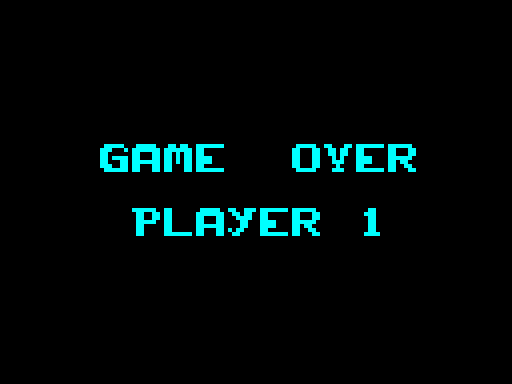
Shows the game over screen for the player whose game has ended, which has "GAME OVER" and the number of the player in large letters. It plays the game over tune.
|
|||||
|
Show the game over screen.
|
|||||
| ShowGameOver | B7A8 | LD E,$00 | Set the attribute to INK:BLACK, PAPER:BLACK. | ||
| B7AA | CALL SetAttributes | Set all the attributes. | |||
| B7AD | CALL ClearScreen | Clear the screen. | |||
| B7B0 | LD A,($A23F) | Fetch the number of the current player, which is zero or one. | |||
| B7B3 | ADD A,$31 | Make it the character "1" or "2". | |||
| B7B5 | LD ($B7EE),A | Put it in the text. | |||
|
Print "GAME OVER".
|
|||||
| B7B8 | LD HL,$4826 | Point HL at 4826 (in the screen buffer). | |||
| B7BB | LD DE,$B7DA | Point DE at GameOverTexts. | |||
| B7BE | CALL PrintLargeText | Print it in large letters. | |||
|
Print the number of the player.
|
|||||
| B7C1 | LD HL,$48A8 | Point HL at 48A8 (in the screen buffer). | |||
| B7C4 | LD DE,$B7E6 | Point DE at GameOverTexts_Player. | |||
| B7C7 | CALL PrintLargeText | Print it in large letters. | |||
|
Play the tune.
|
|||||
| B7CA | LD HL,$0000 | Set the length of the wait. | |||
| B7CD | CALL Wait | Wait for a while. | |||
| B7D0 | XOR A | Write 00 to TunePlayedFlag to allow the tune to play. | |||
| B7D1 | LD ($A242),A | ||||
| B7D4 | LD DE,$B1CF | Point DE at GameOverTune. | |||
| B7D7 | JP PlayMusicOnce | Jump to PlayMusicOnce. | |||
| Prev: B798 | Up: Map | Next: B7DA |