|
Routines |
| Prev: 6BAF | Up: Map | Next: 6BFE |
|
Used by the routines at GameOver_Controller and GameOver_ControllerRestart.
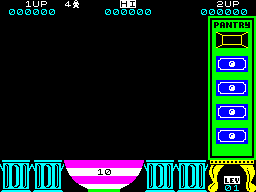
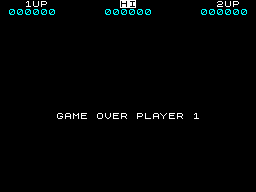
Shows "GAME OVER PLAYER 1" in the play area, and waits for a while. The example below stops before the pause.
|
||||||||
| GameOver_1UP_Messaging | 6BE0 | LD A,"1"+$80 | Fetch the player number "1", with bit 7 set to end the message. | |||||
|
This entry point is used by the routine at GameOver_2UP.
Print the messaging and pause to show it for a period of time.
|
||||||||
| GameOver_Write | 6BE2 | LD ($6C30),A | Write the player number into the message at 6C30. | |||||
| 6BE5 | CALL CreateWindow | Clear the screen and draw the game window using CreateWindow. | ||||||
| 6BE8 | LD DE,$6C1E | Point DE at GameOver_Text. | ||||||
| 6BEB | LD HL,$7038 | HL=7038. | ||||||
| 6BEE | CALL PrintStringColour | Print the message using PrintStringColour. | ||||||
|
Introduce a pause by counting down from 10000 four times.
|
||||||||
| 6BF1 | LD B,$04 | Set the repeat counter to 04. | ||||||
|
This entry point is used by the routine at HandleCake.
|
||||||||
| PauseForCount | 6BF3 | LD HL,$0000 | Set the delay counter to 00 so that it counts down from 10000. | |||||
| GameOver_Pause | 6BF6 | DEC HL | Decrease the delay counter by one. | |||||
| 6BF7 | LD A,H | Loop back to GameOver_Pause until the delay counter is zero. | ||||||
| 6BF8 | OR L | |||||||
| 6BF9 | JR NZ,GameOver_Pause | |||||||
| 6BFB | DJNZ GameOver_Pause | Decrease the repeat counter by one and loop back to GameOver_Pause until the delay has been done four times. | ||||||
| 6BFD | RET | Return. | ||||||
|
View the equivalent code in;
|
||||||||
| Prev: 6BAF | Up: Map | Next: 6BFE |