|
Routines |
| Prev: D561 | Up: Map | Next: D595 |
|
Used by the routine at DrawGameScreen.
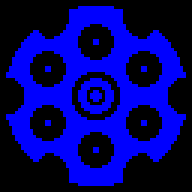
Draws the picture of the revolver, which is a block of eight by eight tiles, and then colours the chambers which are loaded.
|
|||||
|
Draw the picture of the revolver.
|
|||||
| DrawRevolverDisplay | D565 | LD A,$41 | Set the attribute to INK:BLUE, PAPER:BLACK (BRIGHT). | ||
| D567 | EX AF,AF' | ||||
| D568 | LD HL,$5004 | Point HL at 5004 (in the screen buffer). | |||
|
Move it to the right in the town.
|
|||||
| D56B | CALL AddTownOffsetToHL | Call AddTownOffsetToHL. | |||
| D56E | LD DE,$5E51 | Point DE at RevolverTilesDisplay. | |||
| D571 | LD BC,$0808 | Set the size of the block to eight by eight. | |||
|
Draw the block.
|
|||||
| D574 | CALL DrawTileBlock | Call DrawTileBlock. | |||
|
Colour the chambers which are loaded.
|
|||||
| D577 | LD A,($A262) | Return if BulletsLoaded is zero. | |||
| D57A | AND A | ||||
| D57B | RET Z | ||||
| D57C | LD E,A | Keep the number in E. | |||
| D57D | XOR A | Start with the first chamber. | |||
|
Colour a loaded chamber.
|
|||||
| DrawRevolverDisplay_Chamber | D57E | PUSH AF | Stash the chamber number and the number of bullets on the stack. | ||
| D57F | PUSH DE | ||||
| D580 | LD BC,$C9E0 | Point BC at ChamberAddresses. | |||
|
Find the attribute address of the chamber.
|
|||||
| D583 | CALL GetTableEntry | Call GetTableEntry. | |||
|
Move it to the right in the town.
|
|||||
| D586 | CALL AddTownOffsetToHL | Call AddTownOffsetToHL. | |||
| D589 | LD A,$71 | Set the attribute to INK:BLUE, PAPER:YELLOW (BRIGHT). | |||
|
Colour the chamber.
|
|||||
| D58B | CALL FillChamber | Call FillChamber. | |||
| D58E | POP DE | Restore the chamber number and the number of bullets from the stack. | |||
| D58F | POP AF | ||||
| D590 | INC A | Move on to the next chamber. | |||
| D591 | CP E | Jump to DrawRevolverDisplay_Chamber if there are chambers left. | |||
| D592 | JR NZ,DrawRevolverDisplay_Chamber | ||||
| D594 | RET | Return. | |||
| Prev: D561 | Up: Map | Next: D595 |