|
Routines |
| Prev: BB86 | Up: Map | Next: BC54 |
|
Used by the routine at WinRound.
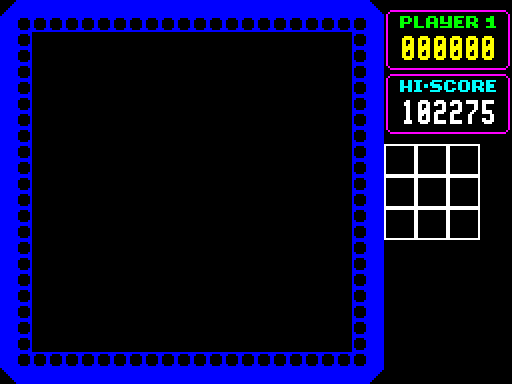
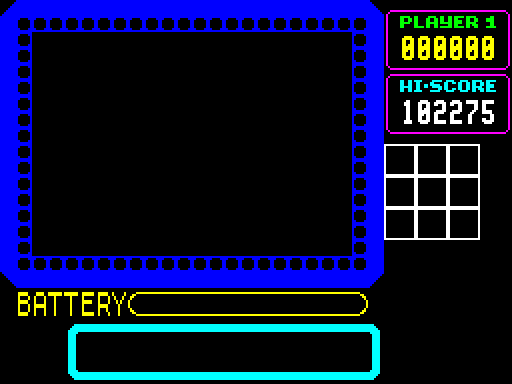
Resets the map and draws the parts of the game screen that are not the play window: the rows of beads above the message area, the message area itself with its rounded box, and the box for the battery meter with its title. It is used when a game is started, and when a round has been completed.
|
||||||||
| DrawGameScreen | BBAA | CALL ResetMap | Reset the map using ResetMap. | |||||
| BBAD | LD HL,$9401 | Point HL at BorderGraphics. | ||||||
| BBB0 | LD ($9618),HL | ...and use them as the current character set. | ||||||
|
Draw the two rows of beads that divide the play window from the message area.
|
||||||||
| BBB3 | LD HL,$5020 | Point HL at the start of the row on character row 11. | ||||||
| BBB6 | LD BC,$1801 | The row is 18 characters wide (B) and starts with character 01 (C). | ||||||
| BBB9 | CALL PrintBorderRow | Draw the row using PrintBorderRow. | ||||||
| BBBC | LD BC,$1602 | The row is 16 characters wide and starts with character 02. | ||||||
| BBBF | LD HL,$5001 | Point HL at the start of the row on character row 10, one column in. | ||||||
| BBC2 | CALL PrintBorderRow | Draw the row. | ||||||
| BBC5 | LD HL,$5A20 | Point HL at the attributes of the lower row. | ||||||
| BBC8 | LD (HL),$48 | Set the first attribute, blue paper with black ink. | ||||||
| BBCA | INC HL | Move on to the second cell. | ||||||
| BBCB | LD BC,$1649 | There are 16 cells, and the attribute is blue paper with blue ink. | ||||||
| BBCE | CALL FillAttributeRow | Set the attributes using FillAttributeRow. | ||||||
| BBD1 | LD (HL),$41 | Set the last attribute, blue ink on a black paper. | ||||||
| BBD3 | LD HL,$5A01 | Point HL at the attributes of the upper row. | ||||||
| BBD6 | LD BC,$1648 | There are 16 cells, and the attribute is blue paper with black ink. | ||||||
| BBD9 | CALL FillAttributeRow | Set the attributes. | ||||||
| BBDC | CALL ClearMessageArea | Clear the message area using ClearMessageArea. | ||||||
| BBDF | LD A,$47 | Fill the attributes of the message area with bright white using FillMessageAttributes. | ||||||
| BBE1 | CALL FillMessageAttributes | |||||||
| BBE4 | LD HL,($5C36) | Fetch the address of the ROM character set... | ||||||
| BBE7 | LD ($9618),HL | ...and use it as the current character set. | ||||||
| BBEA | LD HL,$9008 | Point HL at the position of the title of the battery meter. | ||||||
| BBED | LD DE,$BCCB | Point DE at Message_Battery. | ||||||
| BBF0 | CALL PrintDoubleHeightText | Print it using PrintDoubleHeightText. | ||||||
|
Draw the rounded box of the message area, which is made of four rows of characters.
|
||||||||
| BBF3 | LD HL,$BC54 | Point HL at MessageBoxGraphics. | ||||||
| BBF6 | LD ($9618),HL | ...and use them as the current character set. | ||||||
| BBF9 | LD DE,$BC8C | Point DE at MessageBox_Top. | ||||||
| BBFC | LD HL,$A020 | Point HL at the position of the top row. | ||||||
| BBFF | CALL PrintStringColour_CustomFont | Print it using PrintStringColour_CustomFont. | ||||||
| BC02 | LD DE,$BCA1 | Point DE at MessageBox_Middle. | ||||||
| BC05 | LD HL,$A820 | Point HL at the position of the second row. | ||||||
| BC08 | CALL PrintStringColour_CustomFont | Print it. | ||||||
| BC0B | LD DE,$BCA1 | Point DE at the middle row of the box again. | ||||||
| BC0E | LD HL,$B020 | Point HL at the position of the third row. | ||||||
| BC11 | CALL PrintStringColour_CustomFont | Print it. | ||||||
| BC14 | LD DE,$BCB6 | Point DE at MessageBox_Bottom. | ||||||
| BC17 | LD HL,$B820 | Point HL at the position of the bottom row. | ||||||
| BC1A | CALL PrintStringColour_CustomFont | Print it. | ||||||
|
Draw the box for the battery meter.
|
||||||||
| BC1D | LD HL,$BCE3 | Point HL at BatteryMeterBoxGraphics. | ||||||
| BC20 | LD ($9618),HL | ...and use them as the current character set. | ||||||
| BC23 | LD HL,$9040 | Point HL at the position of the box. | ||||||
| BC26 | LD DE,$BCD3 | Point DE at BatteryMeterBox. | ||||||
| DrawGameScreen_Attributes | BC29 | PUSH HL | Save the position. | |||||
| BC2A | CALL AttributeAddress | Find the address of the attributes using AttributeAddress. | ||||||
| BC2D | LD A,(DE) | Fetch the attribute... | ||||||
| BC2E | INC DE | ...and move on to the first character. | ||||||
| BC2F | LD C,A | Keep the attribute. | ||||||
| BC30 | LD B,$02 | There are two rows of characters. | ||||||
| DrawGameScreen_Row | BC32 | PUSH DE | Save the address of the characters... | |||||
| BC33 | PUSH HL | ...and the address of the attributes. | ||||||
| DrawGameScreen_Cell | BC34 | LD (HL),C | Set an attribute. | |||||
| BC35 | LD A,(DE) | Fetch a character... | ||||||
| BC36 | INC DE | ...and move on to the next one. | ||||||
| BC37 | INC L | Move on to the next attribute. | ||||||
| BC38 | BIT 7,A | Loop back until the last character has been reached. | ||||||
| BC3A | JR Z,DrawGameScreen_Cell | |||||||
| BC3C | POP HL | Restore the address of the attributes... | ||||||
| BC3D | LD DE,$0020 | ...and move down to the next row... | ||||||
| BC40 | ADD HL,DE | ...of the attributes. | ||||||
| BC41 | POP DE | Restore the address of the characters. | ||||||
| BC42 | DJNZ DrawGameScreen_Row | Loop back until both rows have been done. | ||||||
| BC44 | POP HL | Restore the position of the box. | ||||||
| BC45 | CALL ScreenAddress | Find the screen address using ScreenAddress. | ||||||
| DrawGameScreen_Character | BC48 | LD A,(DE) | Fetch a character. | |||||
| BC49 | INC DE | Move on to the next one. | ||||||
| BC4A | BIT 7,A | Jump to PrintBigDigit to print the last character of the box. | ||||||
| BC4C | JP NZ,PrintBigDigit | |||||||
| BC4F | CALL PrintBigDigit | Print a character using PrintBigDigit. | ||||||
| BC52 | JR DrawGameScreen_Character | Loop back until the whole box has been printed. | ||||||
| Prev: BB86 | Up: Map | Next: BC54 |