|
Routines |
| Prev: CC36 | Up: Map | Next: CCE4 |
|
Used by the routines at StartNewLife and CheckMonstersDefeated.
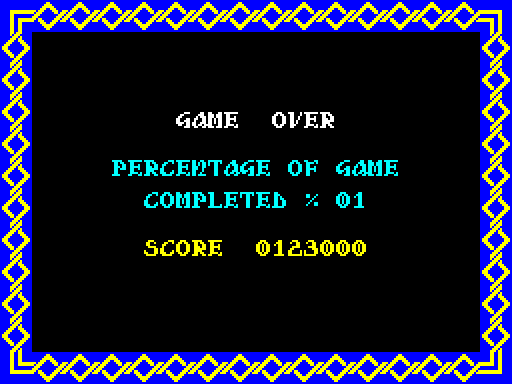
Shows the game over screen, with the percentage of the game that has been completed and the score, and plays a tune. A new game is started if any of the monsters is still alive. Otherwise all of the monsters have been killed, so the ending is shown.
|
|||||
|
Show the game over screen.
|
|||||
| GameOver | CC56 | CALL CalculatePercentage | Work out the percentage of the game that has been completed. | ||
| CC59 | CALL ClearScreen | Clear the screen and draw the frame. | |||
| CC5C | CALL DrawFrame | ||||
| CC5F | LD HL,$8758 | Print "GAME OVER". | |||
| CC62 | LD DE,$CDAF | ||||
| CC65 | CALL PrintStringWithAttribute | ||||
| CC68 | LD HL,$6F38 | Print "PERCENTAGE OF GAME". | |||
| CC6B | CALL PrintStringWithAttribute | ||||
| CC6E | LD HL,$5F48 | Print "COMPLETED =". | |||
| CC71 | CALL PrintStringWithAttribute | ||||
| CC74 | LD HL,$4748 | Print "SCORE". | |||
| CC77 | CALL PrintStringWithAttribute | ||||
| CC7A | LD HL,$4894 | Use bright cyan ink (attribute 45), and print the percentage at 4894 (in the screen buffer). | |||
| CC7D | LD A,$45 | ||||
| CC7F | EX AF,AF' | ||||
| CC80 | CALL PrintPercentage | ||||
| CC83 | LD HL,$48F0 | Use bright yellow ink (attribute 46), and print the score at 48F0 (in the screen buffer). | |||
| CC86 | LD A,$46 | ||||
| CC88 | EX AF,AF' | ||||
| CC89 | CALL PrintScore_Position | ||||
|
Play the tune.
|
|||||
| CC8C | LD DE,$C803 | Play the game over tune. | |||
| CC8F | CALL PlayMusic | ||||
| CC92 | LD B,$04 | Wait for about half a second. | |||
| CC94 | CALL Wait | ||||
|
Start a new game if any of the monsters is still alive.
|
|||||
| CC97 | LD HL,$BD5E | Point at the first monster, set the distance from one object to the next (10 bytes) and set a counter for the four monsters. | |||
| CC9A | LD DE,$0010 | ||||
| CC9D | LD B,$04 | ||||
| GameOver_CheckMonsters | CC9F | LD A,(HL) | Start a new game, keeping the settings, if this monster is still alive. | ||
| CCA0 | SUB $60 | ||||
| CCA2 | CP $10 | ||||
| CCA4 | JP C,StartGame_KeepSettings | ||||
| CCA7 | ADD HL,DE | Move on to the next monster and loop back until all four have been checked. | |||
| CCA8 | DJNZ GameOver_CheckMonsters | ||||
|
All four monsters have been killed. Set up the ending.
|
|||||
| CCAA | CALL RemoveAllObjects | Remove all of the objects. | |||
| CCAD | LD IX,$BC8E | Point IX at the first object, point at the table of pieces for the ending, set the distance from one object to the next (10 bytes) and set a counter for ten pieces. | |||
| CCB1 | LD HL,$CCE4 | ||||
| CCB4 | LD DE,$0010 | ||||
| CCB7 | LD B,$0A | ||||
| GameOver_Pieces | CCB9 | LD A,(HL) | Set the type and the velocities of a piece, clear its flags and offsets, and loop back until all ten pieces have been set up. | ||
| CCBA | INC HL | ||||
| CCBB | LD (IX+$00),A | ||||
| CCBE | LD A,(HL) | ||||
| CCBF | INC HL | ||||
| CCC0 | LD (IX+$0A),A | ||||
| CCC3 | LD A,(HL) | ||||
| CCC4 | INC HL | ||||
| CCC5 | LD (IX+$0B),A | ||||
| CCC8 | XOR A | ||||
| CCC9 | LD (IX+$07),A | ||||
| CCCC | LD (IX+$0C),A | ||||
| CCCF | LD (IX+$0D),A | ||||
| CCD2 | ADD IX,DE | ||||
| CCD4 | DJNZ GameOver_Pieces | ||||
| CCD6 | CALL ClearScreen | Clear the screen. | |||
| CCD9 | LD A,$01 | Flag that the game has been finished. | |||
| CCDB | LD ($BBFF),A | ||||
| CCDE | CALL ClearScreenBuffer | Clear the playing area. | |||
| CCE1 | JP MainLoop | Jump to MainLoop to show the ending. | |||
| Prev: CC36 | Up: Map | Next: CCE4 |