|
Routines |
| Prev: 38280 | Up: Map | Next: 38360 |
|
Used by the routine at Select_Game_Options.
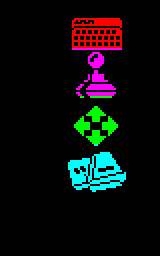
Draws the four icons (keyboard, joystick, cursor keys and Interface II) down the side of the game selection screen, using the object record at Menu_Icon_Record and the sprite ids 140 to 143. The attributes of the icons are red, magenta, green and cyan, like the lines of the menu.
It only does anything the first time it is called.
|
||||||||
| Draw_Menu_Icons | 38307 | LD A,(36599) | Fetch the icons drawn flag from Menu_Icons_Drawn. | |||||
| 38310 | AND A | Return if the icons have already been drawn. | ||||||
| 38311 | RET NZ | |||||||
| 38312 | LD IX,38360 | Point at the record of the menu icon (Menu_Icon_Record). | ||||||
| 38316 | LD (IX+0),140 | Set the sprite id to 140. | ||||||
| 38320 | LD (IX+5),66 | Set the attribute to 66 (red). | ||||||
| 38324 | LD (IX+3),56 | Set the y position to 56. | ||||||
| 38328 | LD B,4 | Set the number of menu icons to draw to 4. | ||||||
| Draw_Menu_Icons_Loop | 38330 | PUSH BC | Stash the icon counter on the stack. | |||||
| 38331 | CALL DrawEntity | Draw the icon. | ||||||
| 38334 | CALL ColourEntity | Set the attributes of the icon. | ||||||
| 38337 | POP BC | Restore the icon counter. | ||||||
| 38338 | LD A,(IX+3) | Fetch the y position of the icon. | ||||||
| 38341 | ADD A,24 | Move down by 24 pixels. | ||||||
| 38343 | LD (IX+3),A | Store the new y position. | ||||||
| 38346 | INC (IX+0) | Move on to the next sprite id. | ||||||
| 38349 | INC (IX+5) | Move on to the next attribute. | ||||||
| 38352 | DJNZ Draw_Menu_Icons_Loop | Decrease the icon counter and loop back until all of the icons are drawn. | ||||||
| 38354 | LD A,1 | Write 1 to Menu_Icons_Drawn to show that the icons have been drawn. | ||||||
| 38356 | LD (36599),A | |||||||
| 38359 | RET | Return. | ||||||
| Prev: 38280 | Up: Map | Next: 38360 |