|
Routines |
| Prev: 48364 | Up: Map | Next: 48521 |
|
Used by the routine at InitialiseGame.
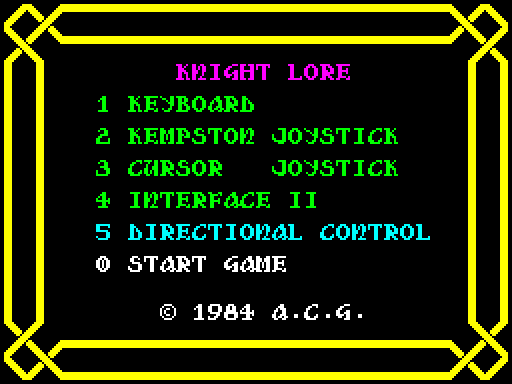
Displays the menu and waits for the control method to be chosen and the game to be started. The keys "1" to "4" choose the keyboard, the Kempston joystick, the cursor joystick and Interface II, "5" turns directional control on or off, and "0" starts the game. A low beep sounds when the choice changes. The menu tune is played once. The choice is held in ControlMethod.
|
||||||||||||||||||||
|
Prepare the menu.
|
||||||||||||||||||||
| GameMenu | 48396 | XOR A | Write 0 to BorderDrawnFlag. | |||||||||||||||||
| 48397 | LD (23480),A | |||||||||||||||||||
| 48400 | LD HL,48546 | Point HL at MenuColours. | ||||||||||||||||||
| 48403 | LD B,8 | Set the number of lines to 8. | ||||||||||||||||||
| GameMenu_StopFlashing | 48405 | RES 7,(HL) | Stop the line flashing. | |||||||||||||||||
| 48407 | INC HL | Move on to the next line. | ||||||||||||||||||
| 48408 | DJNZ GameMenu_StopFlashing | Jump to GameMenu_StopFlashing until all of the lines are done. | ||||||||||||||||||
| 48410 | CALL ClearScreenBuffer | Call ClearScreenBuffer. | ||||||||||||||||||
| 48413 | CALL DisplayMenu | Call DisplayMenu. | ||||||||||||||||||
| 48416 | CALL FlashMenuOptions | Call FlashMenuOptions. | ||||||||||||||||||
|
Read the keys that choose the control method.
|
||||||||||||||||||||
| GameMenu_MenuLoop | 48419 | CALL DisplayMenu | Call DisplayMenu. | |||||||||||||||||
|
|
||||||||||||||||||||
| 48422 | LD DE,45651 | Point DE at MenuTune. | ||||||||||||||||||
| 48425 | CALL PlayMusicOnce | Call PlayMusicOnce. | ||||||||||||||||||
| 48428 | LD A,247 | Read from the keyboard;
|
||||||||||||||||||
| 48430 | CALL ReadKeyboardPort | |||||||||||||||||||
| 48433 | LD E,A | Keep the keys that are pressed in E. | ||||||||||||||||||
| 48434 | LD A,(23460) | Fetch ControlMethod. | ||||||||||||||||||
| 48437 | LD (23462),A | Set PreviousControlMethod. | ||||||||||||||||||
| 48440 | BIT 0,E | Jump to GameMenu_TestKempston if "1" is not pressed. | ||||||||||||||||||
| 48442 | JR Z,GameMenu_TestKempston | |||||||||||||||||||
| 48444 | AND %11111001 | Choose the keyboard. | ||||||||||||||||||
|
Choose a joystick if one of those keys is pressed.
|
||||||||||||||||||||
| GameMenu_TestKempston | 48446 | BIT 1,E | Jump to GameMenu_TestCursor if "2" is not pressed. | |||||||||||||||||
| 48448 | JR Z,GameMenu_TestCursor | |||||||||||||||||||
| 48450 | AND %11111001 | Clear bits 1 and 2. | ||||||||||||||||||
| 48452 | OR %00000010 | Choose the Kempston joystick. | ||||||||||||||||||
| GameMenu_TestCursor | 48454 | BIT 2,E | Jump to GameMenu_TestInterface if "3" is not pressed. | |||||||||||||||||
| 48456 | JR Z,GameMenu_TestInterface | |||||||||||||||||||
| 48458 | AND %11111001 | Clear bits 1 and 2. | ||||||||||||||||||
| 48460 | OR %00000100 | Choose the cursor joystick. | ||||||||||||||||||
| GameMenu_TestInterface | 48462 | BIT 3,E | Jump to GameMenu_SetMethod if "4" is not pressed. | |||||||||||||||||
| 48464 | JR Z,GameMenu_SetMethod | |||||||||||||||||||
| 48466 | OR %00000110 | Choose Interface II. | ||||||||||||||||||
| GameMenu_SetMethod | 48468 | LD (23460),A | Set ControlMethod. | |||||||||||||||||
|
Toggle directional control once for each press of "5".
|
||||||||||||||||||||
| 48471 | LD HL,23506 | Point HL at DirectionalKeyPressedFlag. | ||||||||||||||||||
| 48474 | BIT 4,E | Jump to GameMenu_ReleaseKey5 if "5" is not pressed. | ||||||||||||||||||
| 48476 | JR Z,GameMenu_ReleaseKey5 | |||||||||||||||||||
| 48478 | BIT 0,(HL) | Jump to GameMenu_TestStart if "5" was pressed last time as well. | ||||||||||||||||||
| 48480 | JR NZ,GameMenu_TestStart | |||||||||||||||||||
| 48482 | SET 0,(HL) | Set bit 0 of DirectionalKeyPressedFlag. | ||||||||||||||||||
| 48484 | LD A,(23460) | Fetch ControlMethod. | ||||||||||||||||||
| 48487 | XOR %00001000 | Toggle directional control. | ||||||||||||||||||
| 48489 | LD (23460),A | Set ControlMethod. | ||||||||||||||||||
|
Start the game if "0" is pressed.
|
||||||||||||||||||||
| GameMenu_TestStart | 48492 | LD HL,23462 | Point HL at PreviousControlMethod. | |||||||||||||||||
| 48495 | CP (HL) | Call PlayLowBeep if the control method has changed. | ||||||||||||||||||
| 48496 | CALL NZ,PlayLowBeep | |||||||||||||||||||
| 48499 | LD A,239 | Read from the keyboard;
|
||||||||||||||||||
| 48501 | CALL ReadKeyboardPort | |||||||||||||||||||
| 48504 | BIT 0,A | Return if "0" is pressed. | ||||||||||||||||||
| 48506 | RET NZ | |||||||||||||||||||
| 48507 | LD HL,23456 | Point HL at RandomSeed1. | ||||||||||||||||||
| 48510 | INC (HL) | Increment RandomSeed1. | ||||||||||||||||||
| 48511 | CALL FlashMenuOptions | Call FlashMenuOptions. | ||||||||||||||||||
| 48514 | JP GameMenu_MenuLoop | Jump to GameMenu_MenuLoop. | ||||||||||||||||||
|
"5" has been released.
|
||||||||||||||||||||
| GameMenu_ReleaseKey5 | 48517 | RES 0,(HL) | Reset bit 0 of DirectionalKeyPressedFlag. | |||||||||||||||||
| 48519 | JR GameMenu_TestStart | Jump to GameMenu_TestStart. | ||||||||||||||||||
|
View the equivalent code in;
|
||||||||||||||||||||
| Prev: 48364 | Up: Map | Next: 48521 |