|
Routines |
| Prev: C8B2 | Up: Map | Next: C949 |
|
Used by the routine at StartGame.
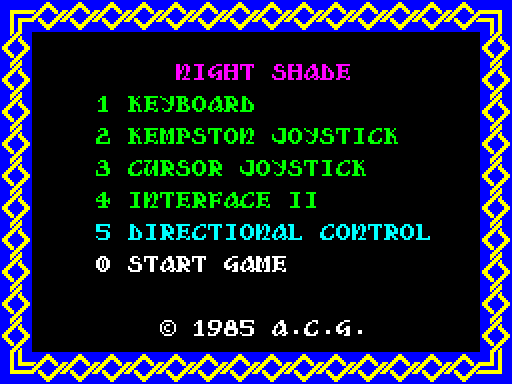
Shows the game selection menu, plays a tune, and waits for the options for the controls to be chosen. The game starts when the "0" key is pressed.
The control method is held in bits 1 and 2 of GameOptions, and bit 3 is set when directional control has been chosen.
|
||||||||||||||||||||
|
Prepare the menu.
|
||||||||||||||||||||
| GameMenu | C8CA | XOR A | Write 00 to *MenuFrameDrawnFlag. | |||||||||||||||||
| C8CB | LD ($BBBF),A | |||||||||||||||||||
| C8CE | LD HL,$C962 | Point HL at MenuLineAttributes. | ||||||||||||||||||
| C8D1 | LD B,$08 | Set the number of lines to 08. | ||||||||||||||||||
| GameMenu_Unflash | C8D3 | RES 7,(HL) | Stop the line flashing. | |||||||||||||||||
| C8D5 | INC HL | Move on to the next line. | ||||||||||||||||||
| C8D6 | DJNZ GameMenu_Unflash | Jump to GameMenu_Unflash until all of the lines are done. | ||||||||||||||||||
| C8D8 | CALL ClearScreenBuffer | Call ClearScreenBuffer. | ||||||||||||||||||
| C8DB | CALL DisplayMenu | Call DisplayMenu. | ||||||||||||||||||
| C8DE | CALL FlashMenuOptions | Call FlashMenuOptions. | ||||||||||||||||||
|
Read the keys that choose the control method.
|
||||||||||||||||||||
| GameMenu_Loop | C8E1 | CALL DisplayMenu | Call DisplayMenu. | |||||||||||||||||
|
|
||||||||||||||||||||
| C8E4 | LD DE,$C770 | Point DE at Tune_Menu. | ||||||||||||||||||
| C8E7 | CALL PlayMusicOnce | Call PlayMusicOnce. | ||||||||||||||||||
|
Read the keys "1" to "5".
|
||||||||||||||||||||
| C8EA | LD A,$F7 | Read from the keyboard;
|
||||||||||||||||||
| C8EC | CALL ReadKeyboardPort | |||||||||||||||||||
| C8EF | LD E,A | Keep the keys that are pressed in E. | ||||||||||||||||||
| C8F0 | LD A,($BBB0) | Fetch GameOptions. | ||||||||||||||||||
| C8F3 | LD ($BBB1),A | Set PreviousGameOptions. | ||||||||||||||||||
| C8F6 | BIT 0,E | Jump to GameMenu_Key2 if "1" is not pressed. | ||||||||||||||||||
| C8F8 | JR Z,GameMenu_Key2 | |||||||||||||||||||
| C8FA | AND %11111001 | Choose the keyboard. | ||||||||||||||||||
|
Choose a joystick if one of those keys is pressed.
|
||||||||||||||||||||
| GameMenu_Key2 | C8FC | BIT 1,E | Jump to GameMenu_Key3 if "2" is not pressed. | |||||||||||||||||
| C8FE | JR Z,GameMenu_Key3 | |||||||||||||||||||
| C900 | AND %11111001 | Clear bits 1 and 2. | ||||||||||||||||||
| C902 | OR %00000010 | Choose the Kempston joystick. | ||||||||||||||||||
| GameMenu_Key3 | C904 | BIT 2,E | Jump to GameMenu_Key4 if "3" is not pressed. | |||||||||||||||||
| C906 | JR Z,GameMenu_Key4 | |||||||||||||||||||
| C908 | AND %11111001 | Clear bits 1 and 2. | ||||||||||||||||||
| C90A | OR %00000100 | Choose the cursor joystick. | ||||||||||||||||||
| GameMenu_Key4 | C90C | BIT 3,E | Jump to GameMenu_SetMethod if "4" is not pressed. | |||||||||||||||||
| C90E | JR Z,GameMenu_SetMethod | |||||||||||||||||||
| C910 | OR %00000110 | Choose Interface II. | ||||||||||||||||||
| GameMenu_SetMethod | C912 | LD ($BBB0),A | Set GameOptions. | |||||||||||||||||
|
Toggle directional control once for each press of "5".
|
||||||||||||||||||||
| C915 | LD HL,$BBBD | Point HL at KeyHeldFlag. | ||||||||||||||||||
| C918 | BIT 4,E | Jump to GameMenu_Key5Released if "5" is not pressed. | ||||||||||||||||||
| C91A | JR Z,GameMenu_Key5Released | |||||||||||||||||||
| C91C | BIT 0,(HL) | Jump to GameMenu_Check if "5" was pressed last time as well. | ||||||||||||||||||
| C91E | JR NZ,GameMenu_Check | |||||||||||||||||||
| C920 | SET 0,(HL) | Set bit 0 of KeyHeldFlag. | ||||||||||||||||||
| C922 | LD A,($BBB0) | Fetch GameOptions. | ||||||||||||||||||
| C925 | XOR %00001000 | Toggle directional control. | ||||||||||||||||||
| C927 | LD ($BBB0),A | Set GameOptions. | ||||||||||||||||||
|
Start the game if "0" is pressed.
|
||||||||||||||||||||
| GameMenu_Check | C92A | LD HL,$BBB1 | Point HL at PreviousGameOptions. | |||||||||||||||||
| C92D | CP (HL) | Compare with the previous options. | ||||||||||||||||||
| C92E | LD DE,$C7F4 | Point DE at Tune_MenuSelection. | ||||||||||||||||||
| C931 | CALL NZ,PlayMusic | Call PlayMusic if the control method has changed. | ||||||||||||||||||
| C934 | LD A,$EF | Read from the keyboard;
|
||||||||||||||||||
| C936 | CALL ReadKeyboardPort | |||||||||||||||||||
| C939 | BIT 0,A | Return if "0" is pressed. | ||||||||||||||||||
| C93B | RET NZ | |||||||||||||||||||
| C93C | CALL IncrementFrameCounter | Call IncrementFrameCounter. | ||||||||||||||||||
| C93F | CALL FlashMenuOptions | Call FlashMenuOptions. | ||||||||||||||||||
| C942 | JP GameMenu_Loop | Jump to GameMenu_Loop. | ||||||||||||||||||
|
"5" has been released.
|
||||||||||||||||||||
| GameMenu_Key5Released | C945 | RES 0,(HL) | Reset bit 0 of KeyHeldFlag. | |||||||||||||||||
| C947 | JR GameMenu_Check | Jump to GameMenu_Check. | ||||||||||||||||||
|
View the equivalent code in;
|
||||||||||||||||||||
| Prev: C8B2 | Up: Map | Next: C949 |