| |
Routines |
| Prev: 25037 | Up: Map | Next: 25154 |
|
Used by the routine at GameOver_ControllerRestart.
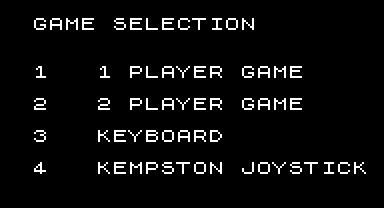
Shows the game selection menu and reads the keys "1" to "5" until the player starts the game by pressing "5". Keys "1" and "2" choose the number of players, keys "3" and "4" choose the control method, and the chosen options are shown by flashing the menu lines.
|
||||||||||||||||||||
| Game_Restart | 25066 | DI | Disable interrupts. | |||||||||||||||||
| 25067 | LD SP,23808 | Reset the stack pointer to 23808 (the top of the game's stack). | ||||||||||||||||||
| 25070 | CALL CreateWindow | Create the game window using CreateWindow. | ||||||||||||||||||
| GameSelect_Loop | 25073 | CALL GameMenu | Print the menu using GameMenu. | |||||||||||||||||
| 25076 | LD A,(24067) | Fetch the game options from GameOptions into D. | ||||||||||||||||||
| 25079 | LD D,A | |||||||||||||||||||
| 25080 | LD A,247 | Read from the keyboard;
|
||||||||||||||||||
| 25082 | OUT (253),A | |||||||||||||||||||
| 25084 | IN A,(254) | |||||||||||||||||||
| 25086 | CPL | Flip the bits, so that a key being pressed is a set bit. | ||||||||||||||||||
|
Handle 1UP selection.
|
||||||||||||||||||||
| 25087 | BIT 0,A | Jump to GameSelect_CheckP2 if key "1" ("1 PLAYER GAME") is not being pressed. | ||||||||||||||||||
| 25089 | JR Z,GameSelect_CheckP2 | |||||||||||||||||||
| 25091 | RES 0,D | Reset bit 0 of D (a 1UP game). | ||||||||||||||||||
|
Handle 2UP selection.
|
||||||||||||||||||||
| GameSelect_CheckP2 | 25093 | BIT 1,A | Jump to GameSelect_CheckKeyboard if key "2" ("2 PLAYER GAME") is not being pressed. | |||||||||||||||||
| 25095 | JR Z,GameSelect_CheckKeyboard | |||||||||||||||||||
| 25097 | SET 0,D | Set bit 0 of D (a 2UP game). | ||||||||||||||||||
|
Handle Keyboard selection.
|
||||||||||||||||||||
| GameSelect_CheckKeyboard | 25099 | BIT 2,A | Jump to GameSelect_CheckKempston if key "3" ("KEYBOARD") is not being pressed. | |||||||||||||||||
| 25101 | JR Z,GameSelect_CheckKempston | |||||||||||||||||||
| 25103 | RES 1,D | Reset bit 1 of D (keyboard control). | ||||||||||||||||||
|
Handle Kempston Joystick selection.
|
||||||||||||||||||||
| GameSelect_CheckKempston | 25105 | BIT 3,A | Jump to GameSelect_StartGame if key "4" ("KEMPSTON JOYSTICK") is not being pressed. | |||||||||||||||||
| 25107 | JR Z,GameSelect_StartGame | |||||||||||||||||||
| 25109 | SET 1,D | Set bit 1 of D (joystick control). | ||||||||||||||||||
|
Handle starting a new game.
|
||||||||||||||||||||
| GameSelect_StartGame | 25111 | BIT 4,A | Jump to StartGame if key "5" ("START GAME") is being pressed. | |||||||||||||||||
| 25113 | JP NZ,StartGame | |||||||||||||||||||
|
Handle flashing each selection.
|
||||||||||||||||||||
| 25116 | LD A,D | Write D to GameOptions. | ||||||||||||||||||
| 25117 | LD (24067),A | |||||||||||||||||||
| 25120 | LD HL,25213 | HL=GameSelection_Attributes_Options (the first selectable line, skipping the title). | ||||||||||||||||||
| 25123 | LD A,(24067) | Fetch the game options from GameOptions into C. | ||||||||||||||||||
| 25126 | LD C,A | |||||||||||||||||||
| MenuAttributeCheckPlayer | 25127 | BIT 0,C | Jump to MenuAttributeHandle2UP if a 2UP game is selected. | |||||||||||||||||
| 25129 | JR NZ,MenuAttributeHandle2UP | |||||||||||||||||||
| 25131 | CALL MenuAttributeSetFirst | Else, flash the first line using MenuAttributeSetFirst. | ||||||||||||||||||
|
Check control method.
|
||||||||||||||||||||
| MenuAttributeCheckControl | 25134 | BIT 1,C | Jump to MenuAttributeHandleJoystick if joystick control is selected. | |||||||||||||||||
| 25136 | JR NZ,MenuAttributeHandleJoystick | |||||||||||||||||||
| 25138 | CALL MenuAttributeSetFirst | Else, flash the first line using MenuAttributeSetFirst. | ||||||||||||||||||
| GameSelect_End | 25141 | JP GameSelect_Loop | Jump back to GameSelect_Loop. | |||||||||||||||||
|
Handle flashing 2UP.
|
||||||||||||||||||||
| MenuAttributeHandle2UP | 25144 | CALL MenuAttributeSetSecond | Flash the second line using MenuAttributeSetSecond. | |||||||||||||||||
| 25147 | JR MenuAttributeCheckControl | Jump to MenuAttributeCheckControl. | ||||||||||||||||||
|
Handle flashing joystick.
|
||||||||||||||||||||
| MenuAttributeHandleJoystick | 25149 | CALL MenuAttributeSetSecond | Flash the second line using MenuAttributeSetSecond. | |||||||||||||||||
| 25152 | JR GameSelect_End | Jump to GameSelect_End. | ||||||||||||||||||
| Prev: 25037 | Up: Map | Next: 25154 |