|
Routines |
| Prev: 9E93 | Up: Map | Next: 9F07 |
|
Used by the routine at Draw_Room.
Shows the screen for escaping from the Underwurlde and then shows the game over screen. It does not return.
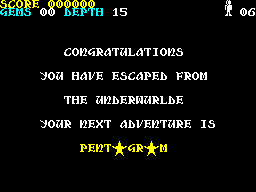
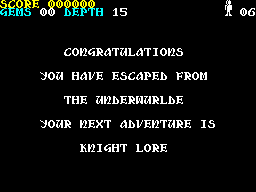
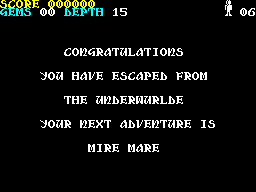
The screen says CONGRATULATIONS and YOU HAVE ESCAPED FROM THE UNDERWURLDE, and then gives the name of the next adventure, which depends on the room x of Sabreman: 03 for KNIGHT LORE, 09 for PENTAGRAM and anything else for MIRE MARE. The two letters A of PENTAGRAM are drawn as star sprites (see Ending_Text).
This is where the game ends if Sabreman reaches room y FF (see Draw_Room).
|
||||||||||
| Show_Ending_Screen | 9EA0 | LD A,$47 | Set the attribute to bright white (47). | |||||||
| 9EA2 | LD ($8EE8),A | Store it as the attribute for printing (Current_MenuAttribute). | ||||||||
| 9EA5 | LD DE,$9F0D | Point at the text CONGRATULATIONS (Ending_Text_Congratulations). | ||||||||
| 9EA8 | LD HL,$3040 | Set the x position to 40 and the y position to 30 (3040). | ||||||||
| 9EAB | CALL MenuWriteText | Print the text. | ||||||||
| 9EAE | LD DE,$9F4B | Point at the text YOU HAVE ESCAPED FROM (Ending_Text_You_Have_Escaped_From). | ||||||||
| 9EB1 | LD HL,$4828 | Set the x position to 28 and the y position to 48 (4828). | ||||||||
| 9EB4 | CALL MenuWriteText | Print the text. | ||||||||
| 9EB7 | LD DE,$9F61 | Point at the text THE UNDERWURLDE (Ending_Text_The_Underwurlde). | ||||||||
| 9EBA | LD HL,$6040 | Set the x position to 40 and the y position to 60 (6040). | ||||||||
| 9EBD | CALL MenuWriteText | Print the text. | ||||||||
| 9EC0 | LD DE,$9F71 | Point at the text YOUR NEXT ADVENTURE IS (Ending_Text_Your_Next_Adventure_Is). | ||||||||
| 9EC3 | LD HL,$7828 | Set the x position to 28 and the y position to 78 (7828). | ||||||||
| 9EC6 | CALL MenuWriteText | Print the text. | ||||||||
| 9EC9 | LD H,$90 | Set the y position for the name of the next adventure to 90. | ||||||||
| 9ECB | LD A,($8F1C) | Fetch the room x of Sabreman. | ||||||||
| 9ECE | CP $03 | Jump to Show_Ending_Screen_Knight_Lore if the room x is 03. | ||||||||
| 9ED0 | JR Z,Show_Ending_Screen_Knight_Lore | |||||||||
| 9ED2 | CP $09 | Jump to Show_Ending_Screen_Pentagram if the room x is 09. | ||||||||
| 9ED4 | JR Z,Show_Ending_Screen_Pentagram | |||||||||
| 9ED6 | LD DE,$9F35 | Point at the text MIRE MARE (Ending_Text_Mire_Mare). | ||||||||
| 9ED9 | LD L,$58 | Set the x position to 58. | ||||||||
| Show_Ending_Screen_Print_Text | 9EDB | CALL MenuWriteText | Print the text. | |||||||
| Show_Ending_Screen_Wait_For_Key | 9EDE | CALL Wait_For_Key | Wait for key 0 to be pressed. | |||||||
| 9EE1 | JP Show_Game_Over | Jump to Show_Game_Over to show the game over screen. | ||||||||
|
The room x is 03.
|
||||||||||
| Show_Ending_Screen_Knight_Lore | 9EE4 | LD DE,$9F1C | Point at the text KNIGHT LORE (Ending_Text_Knight_Lore). | |||||||
| 9EE7 | LD L,$50 | Set the x position to 50. | ||||||||
| 9EE9 | JR Show_Ending_Screen_Print_Text | Jump to Show_Ending_Screen_Print_Text to print the text. | ||||||||
|
The room x is 09. The text PENTAGRAM leaves a gap of two cells for each A, which is filled by a star.
|
||||||||||
| Show_Ending_Screen_Pentagram | 9EEB | LD DE,$9F28 | Point at the attribute and the text PENT GR M (Ending_Text_Pentagram). | |||||||
| 9EEE | LD L,$50 | Set the x position to 50. | ||||||||
| 9EF0 | CALL PrintStringColour | Print the text using the attribute at the start of the string. | ||||||||
| 9EF3 | LD IX,$9F07 | Point at the object record of the star (Ending_Text). | ||||||||
| 9EF7 | LD (IX+$01),$70 | Set the x position of the star to 70. | ||||||||
| 9EFB | CALL Update_Object_Sprite_Draw | Draw the first star. | ||||||||
| 9EFE | LD (IX+$01),$90 | Set the x position of the star to 90. | ||||||||
| 9F02 | CALL Update_Object_Sprite_Draw | Draw the second star. | ||||||||
| 9F05 | JR Show_Ending_Screen_Wait_For_Key | Jump to Show_Ending_Screen_Wait_For_Key to wait for a key. | ||||||||
| Prev: 9E93 | Up: Map | Next: 9F07 |