|
Routines |
| Prev: 9F07 | Up: Map | Next: A021 |
|
Used by the routine at Show_Game_Over.
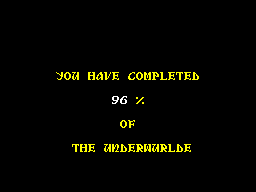
Prints YOU HAVE COMPLETED, the percentage of the Underwurlde that has been explored, and OF THE UNDERWURLDE.
The percentage comes from the room visit table at Room_Visit_Table. The first byte of each of the first 0240 pairs of bytes is non-zero if the room has been visited, and the number of those is the count. The count is multiplied by 20 and has 80 added, so that its high byte is the count divided by eight and rounded. The division routine at Divide then divides that by C0 after multiplying it by 0100 which makes the result about one sixth of the count. The result is held as two BCD digits in Completion_Percentage.
The count and the result are also stored at 5E00 5E02 and 5E04 which nothing reads.
With 0240 entries the result can not be more than 96, so the text 100 is never printed.
|
||||||||
| Print_Completion_Percentage | 9FA3 | LD DE,$9F88 | Point at the text YOU HAVE COMPLETED (Ending_Text_You_Have_Completed). | |||||
| 9FA6 | LD HL,$4838 | Set the x position to 38 and the y position to 48 (4838). | ||||||
| 9FA9 | CALL MenuWriteText | Print the text. | ||||||
| 9FAC | LD DE,$9FA0 | Point at the text OF (Ending_Text_Of). | ||||||
| 9FAF | LD HL,$7878 | Set the x position to 78 and the y position to 78 (7878). | ||||||
| 9FB2 | CALL MenuWriteText | Print the text. | ||||||
| 9FB5 | LD DE,$9F61 | Point at the text THE UNDERWURLDE (Ending_Text_The_Underwurlde). | ||||||
| 9FB8 | LD HL,$9048 | Set the x position to 48 and the y position to 90 (9048). | ||||||
| 9FBB | CALL MenuWriteText | Print the text. | ||||||
|
Count the rooms that have been visited.
|
||||||||
| 9FBE | LD HL,$6000 | Point at the room visit table (Room_Visit_Table). | ||||||
| 9FC1 | LD DE,$0000 | Set the count to 00. | ||||||
| 9FC4 | LD BC,$4003 | BC=4003 (B is 40 and C is 03 which gives 40 passes of the loop and then 0100 twice). | ||||||
| Count_Visited_Rooms | 9FC7 | LD A,(HL) | Fetch the first byte of an entry. | |||||
| 9FC8 | INC HL | Move on to the second byte of the entry. | ||||||
| 9FC9 | INC HL | Move on to the next entry. | ||||||
| 9FCA | AND A | Jump to Print_Completion_Percentage_Next_Room if the room has not been visited. | ||||||
| 9FCB | JR Z,Print_Completion_Percentage_Next_Room | |||||||
| 9FCD | INC DE | Add one to the count. | ||||||
| Print_Completion_Percentage_Next_Room | 9FCE | DJNZ Count_Visited_Rooms | Decrease the inner room counter and loop back until it is zero. | |||||
| 9FD0 | DEC C | Decrease the outer room counter and loop back until every entry of the room visit table has been checked. | ||||||
| 9FD1 | JR NZ,Count_Visited_Rooms | |||||||
|
Work out the percentage.
|
||||||||
| 9FD3 | LD ($5E00),DE | Store the count (nothing reads it). | ||||||
| 9FD7 | LD HL,$00C0 | Set the divisor to C0. | ||||||
| 9FDA | EX DE,HL | Exchange the registers so that DE holds the divisor and HL the count. | ||||||
| 9FDB | ADD HL,HL | Multiply the count by 20. | ||||||
| 9FDC | ADD HL,HL | |||||||
| 9FDD | ADD HL,HL | |||||||
| 9FDE | ADD HL,HL | |||||||
| 9FDF | ADD HL,HL | |||||||
| 9FE0 | LD BC,$0080 | Set the amount to add for rounding to 80. | ||||||
| 9FE3 | ADD HL,BC | Add 80 to round the result. | ||||||
| 9FE4 | CALL Divide | Divide the high byte by DE (see above). | ||||||
| 9FE7 | LD ($5E02),HL | Store the result (nothing reads it). | ||||||
| 9FEA | LD A,L | Fetch the result. | ||||||
| 9FEB | CP $64 | Jump to Print_Completion_Percentage_Print_100 if the result is 100 (64) or more. | ||||||
| 9FED | JR NC,Print_Completion_Percentage_Print_100 | |||||||
| 9FEF | XOR A | Set the percentage counter to the result and clear the BCD percentage. | ||||||
| 9FF0 | LD B,L | |||||||
| 9FF1 | INC B | Add one to the loop counter, as the loop is entered at the end. | ||||||
| 9FF2 | JR Print_Completion_Percentage_Convert_Check | Jump to Print_Completion_Percentage_Convert_Check to start the loop. | ||||||
| Print_Completion_Percentage_Convert_Loop | 9FF4 | ADD A,$01 | Add one. | |||||
| 9FF6 | DAA | Adjust the result to a BCD value. | ||||||
| Print_Completion_Percentage_Convert_Check | 9FF7 | DJNZ Print_Completion_Percentage_Convert_Loop | Decrease the percentage counter and loop back until the percentage has been converted to BCD. | |||||
| 9FF9 | LD ($8EF8),A | Store the percentage. | ||||||
| 9FFC | LD ($5E04),A | Store the percentage again (nothing reads it). | ||||||
| 9FFF | LD HL,$6070 | Set the x position to 70 and the y position to 60 (6070). | ||||||
| A002 | CALL ScreenAddress | Convert the position into a screen address. | ||||||
| A005 | LD DE,$8EF8 | Point at the percentage (Completion_Percentage). | ||||||
| A008 | LD B,$01 | Set the number of digits to print to 01. | ||||||
| A00A | CALL Print_Status_Panel_Digits | Print the digits. | ||||||
| Print_Percent_Sign | A00D | LD DE,$9F9B | Point at the percent sign (Ending_Text_Percent_Sign). | |||||
| A010 | LD HL,$6088 | Set the x position to 88 and the y position to 60 (6088). | ||||||
| A013 | JP MenuWriteText | Jump to MenuWriteText to print the percent sign. | ||||||
| Print_Completion_Percentage_Print_100 | A016 | LD DE,$9F9C | Point at the text 100 (Ending_Text_One_Hundred). | |||||
| A019 | LD HL,$6068 | Set the x position to 68 and the y position to 60 (6068). | ||||||
| A01C | CALL MenuWriteText | Print the text. | ||||||
| A01F | JR Print_Percent_Sign | Jump to Print_Percent_Sign to print the percent sign. | ||||||
| Prev: 9F07 | Up: Map | Next: A021 |