|
Routines |
| Prev: B759 | Up: Map | Next: B7F5 |
|
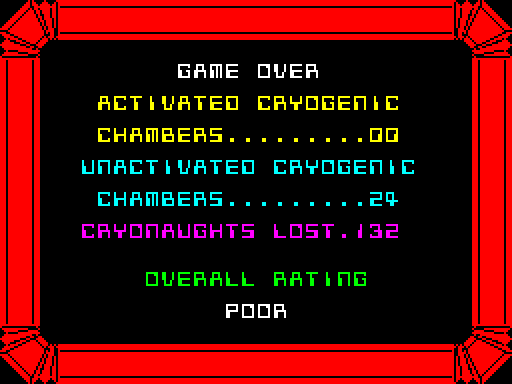
Ends the game. UpdateSpecialObjects is called, and then if GameCompletedFlag is set the completed message is shown first (see GameCompleted). The game over screen shows "GAME OVER", a rating that depends on the rooms visited (20 rooms to each of four ratings) and on GameCompletedFlag, and the statistics. When a key has been pressed the screen is cleared and the objects of an ending scene are placed (see PlaceSceneObjects). If the game was not completed this is the scene of the robot being beaten up, otherwise it is the scene of the robot ending its journey. The main loop is then entered at RunGame_Frame to run the scene.
|
||||||
|
Update the valves and test whether the game is finished.
|
||||||
| GameOver | B761 | CALL UpdateSpecialObjects | Call UpdateSpecialObjects. | |||
| B764 | LD A,($5B23) | Fetch GameCompletedFlag. | ||||
| B767 | AND A | Jump to GameCompleted if it is not zero. | ||||
| B768 | JP NZ,GameCompleted | |||||
|
This entry point is used by the routine at GameCompleted.
Show the game over screen.
|
||||||
| GameOver_ShowStatistics | B76B | CALL ClearScreenBuffer | Call ClearScreenBuffer. | |||
| B76E | CALL ClearScreen | Call ClearScreen. | ||||
| B771 | LD DE,$B94F | Point DE at GameOverColours. | ||||
| B774 | EXX | Switch to the shadow registers. | ||||
| B775 | LD HL,$B956 | Point HL at GameOverCoordinates. | ||||
| B778 | LD DE,$B964 | Point DE at GameOverText. | ||||
| B77B | LD B,$07 | Set the number of lines to 07. | ||||
| B77D | CALL DisplayTextList | Call DisplayTextList. | ||||
|
Work out the rating from the rooms visited and from GameCompletedFlag.
|
||||||
| B780 | CALL CountRoomsVisited | Call CountRoomsVisited. | ||||
| B783 | RLCA | Rotate the count. | ||||
| B784 | AND %11000000 | Keep only bits 6 and 7. | ||||
| B786 | LD C,A | Keep it in C. | ||||
| B787 | LD A,($5B23) | Fetch GameCompletedFlag. | ||||
| B78A | AND %00000001 | Keep only bit 0. | ||||
| B78C | OR C | Combine it with the room count. | ||||
| B78D | RLCA | Rotate the result three times. | ||||
| B78E | RLCA | |||||
| B78F | RLCA | |||||
| B790 | AND %00001110 | Keep only bits 1 to 3. | ||||
| B792 | LD L,A | Keep it in L. | ||||
| B793 | LD H,$00 | Set H to 00. | ||||
| B795 | LD BC,$B9DD | Point BC at RatingMessages. | ||||
| B798 | ADD HL,BC | Add the table address. | ||||
| B799 | LD E,(HL) | Fetch the address of the message. | ||||
| B79A | INC HL | |||||
| B79B | LD D,(HL) | |||||
| B79C | LD HL,$2758 | Set the position of the message to 2758. | ||||
| B79F | CALL PrintTextStandardFont | Call PrintTextStandardFont. | ||||
|
Print the statistics.
|
||||||
| B7A2 | CALL CountStatistics | Call CountStatistics. | ||||
| B7A5 | CALL PrintStatistics | Call PrintStatistics. | ||||
| B7A8 | CALL PrintBorder | Call PrintBorder. | ||||
| B7AB | CALL UpdateScreen | Call UpdateScreen. | ||||
|
Play the tune and wait for a key.
|
||||||
| GameOver_WaitForKeysReleased | B7AE | XOR A | Select all of the keyboard rows. | |||
| B7AF | CALL ReadKeyboardPort | Call ReadKeyboardPort. | ||||
| B7B2 | JR NZ,GameOver_WaitForKeysReleased | Jump to GameOver_WaitForKeysReleased if a key is pressed. | ||||
|
|
||||||
| B7B4 | LD DE,$B3F7 | Point DE at GameOverTune. | ||||
| B7B7 | CALL PlayMusic_WaitKey | Call PlayMusic_WaitKey. | ||||
| B7BA | LD B,$08 | Set the length of the wait to 08. | ||||
| B7BC | CALL WaitForKeyPress | Call WaitForKeyPress. | ||||
|
Start the ending scene.
|
||||||
| B7BF | LD A,$01 | Write 01 to *GameOverFlag. | ||||
| B7C1 | LD ($5B24),A | |||||
| B7C4 | CALL ClearScreenBuffer | Call ClearScreenBuffer. | ||||
| B7C7 | CALL PrintBorder | Call PrintBorder. | ||||
| B7CA | CALL UpdateScreen | Call UpdateScreen. | ||||
| B7CD | CALL ClearObjects | Call ClearObjects. | ||||
| B7D0 | CALL ClearAttributes | Call ClearAttributes. | ||||
| B7D3 | LD A,($5B23) | Fetch GameCompletedFlag. | ||||
| B7D6 | AND A | Jump to GameOver_CompletedScene if it is not zero. | ||||
| B7D7 | JR NZ,GameOver_CompletedScene | |||||
|
The game was not completed.
|
||||||
| B7D9 | LD HL,$9F48 | Set the position of the message to 9F48. | ||||
| B7DC | LD DE,$B7F5 | Point DE at ReprogrammingMessage. | ||||
| B7DF | CALL PrintTextStandardFont | Call PrintTextStandardFont. | ||||
| B7E2 | LD DE,$B82A | Point DE at GameOverScene. | ||||
|
Place the objects of the scene and run it.
|
||||||
| GameOver_StartScene | B7E5 | CALL PlaceSceneObjects | Call PlaceSceneObjects. | |||
| B7E8 | LD A,$01 | Write 01 to *RedrawPanelFlag. | ||||
| B7EA | LD ($5B17),A | |||||
| B7ED | JP RunGame_Frame | Jump to RunGame_Frame. | ||||
|
The game was completed.
|
||||||
| GameOver_CompletedScene | B7F0 | LD DE,$B853 | Point DE at GameCompletedScene. | |||
| B7F3 | JR GameOver_StartScene | Jump to GameOver_StartScene. | ||||
| Prev: B759 | Up: Map | Next: B7F5 |