|
Routines |
| Prev: 6628 | Up: Map | Next: 6837 |
|
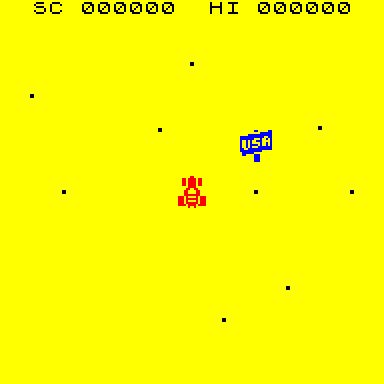
Moves and draws one of the two cars (the entities at Entity_Car_1 and Entity_Car_2), which chase the player. The car is drawn at its position relative to the player, but only when it is closer than 58 map units in both directions. It is then steered towards the player, bounces off objects, and destroys the player if it hits.
|
||||||||||||||||||||||||||||||||||
|
Draw the car using the sprite ID from the last frame.
|
||||||||||||||||||||||||||||||||||
| HandlerCar | 6633 | LD A,(IX+$0B) | Fetch the sprite ID of the car from the last frame. | |||||||||||||||||||||||||||||||
| 6636 | LD (IX+$00),A | Write A to the first byte of the entity, as this is the sprite ID that StoreEntity copies. | ||||||||||||||||||||||||||||||||
| 6639 | CALL StoreEntity | Call StoreEntity to copy the position and sprite ID of the entity. | ||||||||||||||||||||||||||||||||
|
Move the car in the X direction. The distance moved is the X speed divided by 04 or by 02 for the faster car.
|
||||||||||||||||||||||||||||||||||
| 663C | LD D,(IX+$05) | D=high byte of the X position. | ||||||||||||||||||||||||||||||||
| 663F | LD E,(IX+$04) | E=low byte of the X position. | ||||||||||||||||||||||||||||||||
| 6642 | LD A,(IX+$08) | Fetch the X speed of the car. | ||||||||||||||||||||||||||||||||
| 6645 | BIT 7,(IX+$0A) | If the car is the faster car (bit 7 of the flags is set) then jump to HandlerCar_ScaleSpeedX. | ||||||||||||||||||||||||||||||||
| 6649 | JR NZ,HandlerCar_ScaleSpeedX | |||||||||||||||||||||||||||||||||
| 664B | RRA | Halve the speed again, as this is not the faster car. | ||||||||||||||||||||||||||||||||
| HandlerCar_ScaleSpeedX | 664C | RRA | Halve the speed. | |||||||||||||||||||||||||||||||
| 664D | AND %00001111 | Keep only bits 0-3 to give the distance to move. | ||||||||||||||||||||||||||||||||
| 664F | LD L,A | HL=the distance to move. | ||||||||||||||||||||||||||||||||
| 6650 | LD H,$00 | |||||||||||||||||||||||||||||||||
| 6652 | BIT 7,(IX+$08) | If the car is moving towards lower X then jump to ReduceCarX to subtract the distance. | ||||||||||||||||||||||||||||||||
| 6656 | JR NZ,ReduceCarX | |||||||||||||||||||||||||||||||||
| 6658 | ADD HL,DE | Add the distance to the X position. | ||||||||||||||||||||||||||||||||
|
This entry point is used by the routine at ReduceCarX.
|
||||||||||||||||||||||||||||||||||
| HandlerCar_StoreX | 6659 | LD (IX+$05),H | Store the high byte of the new X position. | |||||||||||||||||||||||||||||||
| 665C | LD (IX+$04),L | Store the low byte of the new X position. | ||||||||||||||||||||||||||||||||
| 665F | SRL H | Halve the X position (to match the scale of the player position). | ||||||||||||||||||||||||||||||||
| 6661 | RR L | |||||||||||||||||||||||||||||||||
| 6663 | PUSH HL | Stash the X position on the stack. | ||||||||||||||||||||||||||||||||
|
Move the car in the Y direction in the same way.
|
||||||||||||||||||||||||||||||||||
| 6664 | LD D,(IX+$07) | D=high byte of the Y position. | ||||||||||||||||||||||||||||||||
| 6667 | LD E,(IX+$06) | E=low byte of the Y position. | ||||||||||||||||||||||||||||||||
| 666A | LD A,(IX+$09) | A=Y speed. | ||||||||||||||||||||||||||||||||
| 666D | BIT 7,(IX+$0A) | If bit 7 of the flags is set then jump to HandlerCar_ScaleSpeedY. | ||||||||||||||||||||||||||||||||
| 6671 | JR NZ,HandlerCar_ScaleSpeedY | |||||||||||||||||||||||||||||||||
| 6673 | RRA | Divide A by two. | ||||||||||||||||||||||||||||||||
| HandlerCar_ScaleSpeedY | 6674 | RRA | Divide A by two. | |||||||||||||||||||||||||||||||
| 6675 | AND %00001111 | Keep only bits 0-3. | ||||||||||||||||||||||||||||||||
| 6677 | LD L,A | HL=the distance to move. | ||||||||||||||||||||||||||||||||
| 6678 | LD H,$00 | |||||||||||||||||||||||||||||||||
| 667A | BIT 7,(IX+$09) | If the car is moving towards lower Y then jump to ReduceCarY to subtract the distance. | ||||||||||||||||||||||||||||||||
| 667E | JR NZ,ReduceCarY | |||||||||||||||||||||||||||||||||
| 6680 | ADD HL,DE | Add the distance to the Y position. | ||||||||||||||||||||||||||||||||
|
This entry point is used by the routine at ReduceCarY.
|
||||||||||||||||||||||||||||||||||
| HandlerCar_StoreY | 6681 | LD (IX+$07),H | Store the high byte of the new Y position. | |||||||||||||||||||||||||||||||
| 6684 | LD (IX+$06),L | Store the low byte of the new Y position. | ||||||||||||||||||||||||||||||||
| 6687 | SRL H | Halve the Y position (to match the scale of the player position). | ||||||||||||||||||||||||||||||||
| 6689 | RR L | |||||||||||||||||||||||||||||||||
|
Work out the distance between the car and the player, and which side of the player the car is on. This is kept in the shadow AF register: bit 0 is set if the car is below the player and bit 1 is set if the car is to the left of the player.
|
||||||||||||||||||||||||||||||||||
| 668B | LD DE,($5E08) | Fetch the player's Y position on the map (PlayerMapPositionY). | ||||||||||||||||||||||||||||||||
| 668F | XOR A | Reset the shadow AF register. | ||||||||||||||||||||||||||||||||
| 6690 | EX AF,AF' | |||||||||||||||||||||||||||||||||
| 6691 | SBC HL,DE | Take the player's Y position away from the Y position of the car. | ||||||||||||||||||||||||||||||||
| 6693 | JR NC,HandlerCar_DistanceX | If the car is not below the player then jump to HandlerCar_DistanceX. | ||||||||||||||||||||||||||||||||
| 6695 | CALL NegateHL | Call NegateHL to make the distance positive. | ||||||||||||||||||||||||||||||||
| 6698 | EX AF,AF' | Switch to the shadow AF register. | ||||||||||||||||||||||||||||||||
| 6699 | LD A,$01 | Set bit 0 by making A 01 as the car is below the player. | ||||||||||||||||||||||||||||||||
| 669B | EX AF,AF' | Switch back to the normal AF register. | ||||||||||||||||||||||||||||||||
|
Do the same for the X direction.
|
||||||||||||||||||||||||||||||||||
| HandlerCar_DistanceX | 669C | EX (SP),HL | Swap the Y distance with the X position on the stack. | |||||||||||||||||||||||||||||||
| 669D | LD DE,($5E05) | Fetch the player's X position on the map (PlayerMapPosition). | ||||||||||||||||||||||||||||||||
| 66A1 | AND A | Reset the carry flag. | ||||||||||||||||||||||||||||||||
| 66A2 | SBC HL,DE | Take the player's X position away from the X position of the car. | ||||||||||||||||||||||||||||||||
| 66A4 | JR NC,HandlerCar_CheckVisible | If the car is not to the left of the player then jump to HandlerCar_CheckVisible. | ||||||||||||||||||||||||||||||||
| 66A6 | CALL NegateHL | Call NegateHL to make the distance positive. | ||||||||||||||||||||||||||||||||
| 66A9 | EX AF,AF' | Switch to the shadow AF register. | ||||||||||||||||||||||||||||||||
| 66AA | OR %00000010 | Set bit 1. | ||||||||||||||||||||||||||||||||
| 66AC | EX AF,AF' | Switch back to the normal AF register. | ||||||||||||||||||||||||||||||||
| HandlerCar_CheckVisible | 66AD | POP DE | Fetch the Y distance from the player. | |||||||||||||||||||||||||||||||
| 66AE | EX AF,AF' | Switch to the shadow AF register. | ||||||||||||||||||||||||||||||||
| 66AF | LD C,A | Keep the direction flags in C. | ||||||||||||||||||||||||||||||||
|
The car is only drawn when both distances are less than 58.
|
||||||||||||||||||||||||||||||||||
| 66B0 | LD A,H | Jump to HandlerCar_TooFar if either distance is more than FF. | ||||||||||||||||||||||||||||||||
| 66B1 | OR D | |||||||||||||||||||||||||||||||||
| 66B2 | JP NZ,HandlerCar_TooFar | |||||||||||||||||||||||||||||||||
| 66B5 | LD A,L | Jump to HandlerCar_TooFar if the X distance is 58 or more. | ||||||||||||||||||||||||||||||||
| 66B6 | CP $58 | |||||||||||||||||||||||||||||||||
| 66B8 | JP NC,HandlerCar_TooFar | |||||||||||||||||||||||||||||||||
| 66BB | LD A,E | Jump to HandlerCar_TooFar if the Y distance is 58 or more. | ||||||||||||||||||||||||||||||||
| 66BC | CP $58 | |||||||||||||||||||||||||||||||||
| 66BE | JP NC,HandlerCar_TooFar | |||||||||||||||||||||||||||||||||
|
Work out the position of the car on the screen. The player is at 98 across and 68 down.
|
||||||||||||||||||||||||||||||||||
| 66C1 | BIT 0,C | If the car is below the player then jump to HandlerCar_AddPlayerY. | ||||||||||||||||||||||||||||||||
| 66C3 | JR NZ,HandlerCar_AddPlayerY | |||||||||||||||||||||||||||||||||
| 66C5 | NEG | Negate the Y distance, as the car is above the player. | ||||||||||||||||||||||||||||||||
| HandlerCar_AddPlayerY | 66C7 | ADD A,$68 | Add 68 (the Y position of the player). | |||||||||||||||||||||||||||||||
| 66C9 | LD (IX+$02),A | Store the Y position of the car. | ||||||||||||||||||||||||||||||||
| 66CC | BIT 1,C | Check if the car is to the left of the player. | ||||||||||||||||||||||||||||||||
| 66CE | LD A,L | Fetch the X distance from the player. | ||||||||||||||||||||||||||||||||
| 66CF | JR Z,HandlerCar_AddPlayerX | If the car is not to the left of the player then jump to HandlerCar_AddPlayerX. | ||||||||||||||||||||||||||||||||
| 66D1 | NEG | Negate the X distance, as the car is to the left of the player. | ||||||||||||||||||||||||||||||||
| HandlerCar_AddPlayerX | 66D3 | ADD A,$98 | Add 98 (the X position of the player). | |||||||||||||||||||||||||||||||
| 66D5 | LD (IX+$01),A | Store the X position of the car. | ||||||||||||||||||||||||||||||||
|
Choose which of the 10 car sprites to use, so that the car points in the direction it is moving. The quadrant of travel comes from the direction bits (bit 7) of the two speeds, and the angle within it from CarDirectionTable using the top three bits of each speed.
|
||||||||||||||||||||||||||||||||||
| 66D8 | PUSH BC | Stash the direction flags on the stack. | ||||||||||||||||||||||||||||||||
| 66D9 | LD A,(IX+$09) | Fetch the Y speed and keep it in E. | ||||||||||||||||||||||||||||||||
| 66DC | LD E,A | |||||||||||||||||||||||||||||||||
| 66DD | RLCA | Rotate A left so that bit 0 is the direction bit of the Y speed. | ||||||||||||||||||||||||||||||||
| 66DE | LD C,(IX+$08) | Fetch the X speed and keep it in B. | ||||||||||||||||||||||||||||||||
| 66E1 | LD B,C | |||||||||||||||||||||||||||||||||
| 66E2 | RLC C | Rotate C left so that bit 0 is the direction bit of the X speed. | ||||||||||||||||||||||||||||||||
| 66E4 | XOR C | Exclusive OR A with C. | ||||||||||||||||||||||||||||||||
| 66E5 | AND %00000001 | Keep only bit 0. | ||||||||||||||||||||||||||||||||
| 66E7 | SLA C | Shift C left so that bit 1 is the direction bit of the X speed. | ||||||||||||||||||||||||||||||||
| 66E9 | OR C | Combine the bits. | ||||||||||||||||||||||||||||||||
| 66EA | AND %00000011 | Keep only bits 0-1 (the quadrant). | ||||||||||||||||||||||||||||||||
| 66EC | SLA A | Multiply the quadrant by 04. | ||||||||||||||||||||||||||||||||
| 66EE | SLA A | |||||||||||||||||||||||||||||||||
| 66F0 | LD C,A | Keep the quadrant in C. | ||||||||||||||||||||||||||||||||
| 66F1 | LD A,B | Fetch the X speed. | ||||||||||||||||||||||||||||||||
| 66F2 | RRA | Divide the X speed by four. | ||||||||||||||||||||||||||||||||
| 66F3 | RRA | |||||||||||||||||||||||||||||||||
| 66F4 | AND %00000111 | Keep only bits 0-2. | ||||||||||||||||||||||||||||||||
| 66F6 | LD B,A | Keep the X speed bits in B. | ||||||||||||||||||||||||||||||||
| 66F7 | LD A,E | Fetch the Y speed. | ||||||||||||||||||||||||||||||||
| 66F8 | RLA | Rotate A left. | ||||||||||||||||||||||||||||||||
| 66F9 | AND %00111000 | Keep only bits 3-5. | ||||||||||||||||||||||||||||||||
| 66FB | OR B | Combine with the X speed bits. | ||||||||||||||||||||||||||||||||
| 66FC | LD E,A | E=the index into the table. | ||||||||||||||||||||||||||||||||
| 66FD | LD D,$00 | D=00. | ||||||||||||||||||||||||||||||||
| 66FF | LD HL,$683B | Point HL at the table of angles (CarDirectionTable). | ||||||||||||||||||||||||||||||||
| 6702 | ADD HL,DE | Add the index to the start of the table. | ||||||||||||||||||||||||||||||||
| 6703 | LD A,(HL) | Fetch the angle from the table. | ||||||||||||||||||||||||||||||||
| 6704 | CP $FF | Compare the angle with FF. | ||||||||||||||||||||||||||||||||
| 6706 | JR Z,HandlerCar_Colour | If the car has no speed then keep the same sprite and jump to HandlerCar_Colour. | ||||||||||||||||||||||||||||||||
| 6708 | BIT 2,C | Jump to HandlerCar_SetSprite if the quadrant is not odd. | ||||||||||||||||||||||||||||||||
| 670A | JR Z,HandlerCar_SetSprite | |||||||||||||||||||||||||||||||||
| 670C | NEG | Negate the angle. | ||||||||||||||||||||||||||||||||
| 670E | INC C | Add 04 to C. | ||||||||||||||||||||||||||||||||
| 670F | INC C | |||||||||||||||||||||||||||||||||
| 6710 | INC C | |||||||||||||||||||||||||||||||||
| 6711 | INC C | |||||||||||||||||||||||||||||||||
| HandlerCar_SetSprite | 6712 | ADD A,C | Add the quadrant. | |||||||||||||||||||||||||||||||
| 6713 | AND %00001111 | Keep only bits 0-3. | ||||||||||||||||||||||||||||||||
| 6715 | ADD A,$10 | Add 10 to get the sprite ID. | ||||||||||||||||||||||||||||||||
| 6717 | LD (IX+$0B),A | Store the sprite ID. | ||||||||||||||||||||||||||||||||
| 671A | LD (IX+$00),A | Write the sprite ID to the first byte of the entity, as this is the sprite ID that DisplayEntity draws. | ||||||||||||||||||||||||||||||||
|
Set the colour of the car, which depends on whether it is day or night, then draw it.
|
||||||||||||||||||||||||||||||||||
| HandlerCar_Colour | 671D | LD C,(IX+$03) | Fetch the colour of the car. | |||||||||||||||||||||||||||||||
| 6720 | LD A,($5E43) | Fetch the day/night flag (Flag_DayNight). | ||||||||||||||||||||||||||||||||
| 6723 | PUSH BC | Stash BC on the stack. | ||||||||||||||||||||||||||||||||
| 6724 | LD B,$00 | Clear the high byte of the table index. | ||||||||||||||||||||||||||||||||
| 6726 | ADD A,C | Add the colour to the day/night flag. | ||||||||||||||||||||||||||||||||
| 6727 | LD C,A | Keep the index into the table of car attributes in C. | ||||||||||||||||||||||||||||||||
| 6728 | LD HL,$6837 | Point HL at the table of car attributes (CarAttributes). | ||||||||||||||||||||||||||||||||
| 672B | ADD HL,BC | Add the index to the start of the table. | ||||||||||||||||||||||||||||||||
| 672C | LD A,(HL) | Fetch the attribute of the car. | ||||||||||||||||||||||||||||||||
| 672D | LD (IX+$03),A | Write the attribute to the colour byte of the entity. | ||||||||||||||||||||||||||||||||
| 6730 | CALL DisplayEntity | Call DisplayEntity to erase the old car and draw the new one. | ||||||||||||||||||||||||||||||||
| 6733 | CALL ColouriseSprite | Call ColouriseSprite to set the attributes of the car. | ||||||||||||||||||||||||||||||||
| 6736 | POP BC | Restore BC from the stack. | ||||||||||||||||||||||||||||||||
| 6737 | LD (IX+$03),C | Put the colour back in the entity. | ||||||||||||||||||||||||||||||||
| 673A | POP BC | Restore the direction flags from the stack. | ||||||||||||||||||||||||||||||||
| 673B | SET 0,(IX+$0A) | Set bit 0 of the flags (the car is drawn). | ||||||||||||||||||||||||||||||||
| 673F | JR HandlerCar_SteerX | Jump to HandlerCar_SteerX. | ||||||||||||||||||||||||||||||||
|
The car is too far away to be seen. If it was drawn then erase it.
|
||||||||||||||||||||||||||||||||||
| HandlerCar_TooFar | 6741 | BIT 0,(IX+$0A) | If the car has not been drawn then jump to HandlerCar_SteerX. | |||||||||||||||||||||||||||||||
| 6745 | JR Z,HandlerCar_SteerX | |||||||||||||||||||||||||||||||||
| 6747 | RES 0,(IX+$0A) | Reset bit 0 of the flags (the car is no longer drawn). | ||||||||||||||||||||||||||||||||
| 674B | PUSH BC | Stash the direction flags on the stack. | ||||||||||||||||||||||||||||||||
| 674C | CALL RemoveEntity | Call RemoveEntity to erase the car. | ||||||||||||||||||||||||||||||||
| 674F | POP BC | Restore the direction flags from the stack. | ||||||||||||||||||||||||||||||||
|
Steer the car towards the player, starting with the X speed.
|
||||||||||||||||||||||||||||||||||
| HandlerCar_SteerX | 6750 | BIT 1,C | Check if the car is to the left of the player. | |||||||||||||||||||||||||||||||
| 6752 | LD A,(IX+$08) | Fetch the X speed. | ||||||||||||||||||||||||||||||||
| 6755 | JR NZ,HandlerCar_SteerLeft | If the car is to the left of the player then jump to HandlerCar_SteerLeft. | ||||||||||||||||||||||||||||||||
|
The car is to the right of the player, so it wants to move towards lower X.
|
||||||||||||||||||||||||||||||||||
| 6757 | BIT 7,A | If the car is moving towards higher X then jump to HandlerCar_SlowDownX to slow it down. | ||||||||||||||||||||||||||||||||
| 6759 | JR Z,HandlerCar_SlowDownX | |||||||||||||||||||||||||||||||||
| 675B | AND %00011111 | Keep only bits 0-4 (the speed). | ||||||||||||||||||||||||||||||||
| HandlerCar_SpeedUpX | 675D | BIT 7,(IX+$0A) | If it is the faster car then jump to HandlerCar_LimitX. | |||||||||||||||||||||||||||||||
| 6761 | JR NZ,HandlerCar_LimitX | |||||||||||||||||||||||||||||||||
| 6763 | CP $1F | Compare the speed with the limit of 1F. | ||||||||||||||||||||||||||||||||
| HandlerCar_CheckLimitX | 6765 | JR NC,HandlerCar_SteerY | If the speed is at the limit then jump to HandlerCar_SteerY. | |||||||||||||||||||||||||||||||
| 6767 | INC (IX+$08) | Increase the X speed by one. | ||||||||||||||||||||||||||||||||
|
Do the same for the Y speed.
|
||||||||||||||||||||||||||||||||||
| HandlerCar_SteerY | 676A | BIT 0,C | Check if the car is below the player. | |||||||||||||||||||||||||||||||
| 676C | LD A,(IX+$09) | Fetch the Y speed. | ||||||||||||||||||||||||||||||||
| 676F | JR NZ,HandlerCar_SteerBelow | If it is then jump to HandlerCar_SteerBelow. | ||||||||||||||||||||||||||||||||
|
The car is above the player, so it wants to move towards lower Y.
|
||||||||||||||||||||||||||||||||||
| 6771 | BIT 7,A | If the car is moving towards higher Y then jump to HandlerCar_SlowDownY to slow it down. | ||||||||||||||||||||||||||||||||
| 6773 | JR Z,HandlerCar_SlowDownY | |||||||||||||||||||||||||||||||||
| 6775 | AND %00011111 | Keep only bits 0-4 (the speed). | ||||||||||||||||||||||||||||||||
| HandlerCar_SpeedUpY | 6777 | BIT 7,(IX+$0A) | If it is the faster car then jump to HandlerCar_LimitY. | |||||||||||||||||||||||||||||||
| 677B | JR NZ,HandlerCar_LimitY | |||||||||||||||||||||||||||||||||
| 677D | CP $1F | Compare the speed with the limit of 1F. | ||||||||||||||||||||||||||||||||
| HandlerCar_CheckLimitY | 677F | JR NC,HandlerCar_Collisions | If the speed is at the limit then jump to HandlerCar_Collisions. | |||||||||||||||||||||||||||||||
| 6781 | INC (IX+$09) | Increase the Y speed by one. | ||||||||||||||||||||||||||||||||
| 6784 | JR HandlerCar_Collisions | Jump to HandlerCar_Collisions. | ||||||||||||||||||||||||||||||||
|
Slow the car down. When it stops, the direction bit is set so that the car speeds up in the opposite direction.
|
||||||||||||||||||||||||||||||||||
| HandlerCar_SlowDownX | 6786 | DEC (IX+$08) | Decrease the X speed by one. | |||||||||||||||||||||||||||||||
| 6789 | JR NZ,HandlerCar_SteerY | If the speed is not zero then jump to HandlerCar_SteerY. | ||||||||||||||||||||||||||||||||
| 678B | SET 7,(IX+$08) | Set bit 7 of the X speed. | ||||||||||||||||||||||||||||||||
| 678F | JR HandlerCar_SteerY | Jump to HandlerCar_SteerY. | ||||||||||||||||||||||||||||||||
|
The limit on the speed of the faster car is lower.
|
||||||||||||||||||||||||||||||||||
| HandlerCar_LimitX | 6791 | CP $15 | Compare the speed with the limit of 15. | |||||||||||||||||||||||||||||||
| 6793 | JR HandlerCar_CheckLimitX | Jump to HandlerCar_CheckLimitX. | ||||||||||||||||||||||||||||||||
| HandlerCar_LimitY | 6795 | CP $15 | Compare the speed with the limit of 15. | |||||||||||||||||||||||||||||||
| 6797 | JR HandlerCar_CheckLimitY | Jump to HandlerCar_CheckLimitY. | ||||||||||||||||||||||||||||||||
|
The car is to the left of the player, so it wants to move towards higher X.
|
||||||||||||||||||||||||||||||||||
| HandlerCar_SteerLeft | 6799 | BIT 7,A | If the car is moving towards higher X then jump to HandlerCar_SpeedUpX to speed it up. | |||||||||||||||||||||||||||||||
| 679B | JR Z,HandlerCar_SpeedUpX | |||||||||||||||||||||||||||||||||
| 679D | AND %00011111 | Keep only bits 0-4 (the speed). | ||||||||||||||||||||||||||||||||
| 679F | JR NZ,HandlerCar_SlowDownX | If the car is still moving then jump to HandlerCar_SlowDownX to slow it down. | ||||||||||||||||||||||||||||||||
| 67A1 | LD (IX+$08),$00 | Set the X speed to zero. | ||||||||||||||||||||||||||||||||
| 67A5 | JR HandlerCar_SteerY | Jump to HandlerCar_SteerY. | ||||||||||||||||||||||||||||||||
| HandlerCar_SlowDownY | 67A7 | DEC (IX+$09) | Decrease the Y speed by one. | |||||||||||||||||||||||||||||||
| 67AA | JR NZ,HandlerCar_Collisions | If the speed is not zero then jump to HandlerCar_Collisions. | ||||||||||||||||||||||||||||||||
| 67AC | SET 7,(IX+$09) | Set bit 7 of the Y speed. | ||||||||||||||||||||||||||||||||
| 67B0 | JR HandlerCar_Collisions | Jump to HandlerCar_Collisions. | ||||||||||||||||||||||||||||||||
|
The car is below the player, so it wants to move towards higher Y.
|
||||||||||||||||||||||||||||||||||
| HandlerCar_SteerBelow | 67B2 | BIT 7,A | If the car is moving towards higher Y then jump to HandlerCar_SpeedUpY to speed it up. | |||||||||||||||||||||||||||||||
| 67B4 | JR Z,HandlerCar_SpeedUpY | |||||||||||||||||||||||||||||||||
| 67B6 | AND %00011111 | Keep only bits 0-4 (the speed). | ||||||||||||||||||||||||||||||||
| 67B8 | JR NZ,HandlerCar_SlowDownY | If the car is still moving then jump to HandlerCar_SlowDownY to slow it down. | ||||||||||||||||||||||||||||||||
| 67BA | LD (IX+$09),$00 | Set the Y speed to zero. | ||||||||||||||||||||||||||||||||
|
Put the state back, then check whether the car has hit an object.
|
||||||||||||||||||||||||||||||||||
| HandlerCar_Collisions | 67BE | LD (IX+$00),$02 | Write 02 (the car state) to the first byte of the entity. | |||||||||||||||||||||||||||||||
| 67C2 | BIT 0,(IX+$0A) | Return if the car is not drawn. | ||||||||||||||||||||||||||||||||
| 67C6 | RET Z | |||||||||||||||||||||||||||||||||
| 67C7 | LD HL,$5E50 | Point HL at the first object (Object_1_State). | ||||||||||||||||||||||||||||||||
| 67CA | LD B,$07 | Set the object counter to 07. | ||||||||||||||||||||||||||||||||
| HandlerCar_ObjectLoop | 67CC | BIT 6,(HL) | If bit 6 of the object (a place name or collected cup) is set then jump to HandlerCar_NextObject to skip it. | |||||||||||||||||||||||||||||||
| 67CE | JR NZ,HandlerCar_NextObject | |||||||||||||||||||||||||||||||||
| 67D0 | INC HL | Move on to the X position of the object. | ||||||||||||||||||||||||||||||||
| 67D1 | LD A,(HL) | Fetch the X position of the object. | ||||||||||||||||||||||||||||||||
| 67D2 | SUB (IX+$01) | Take the X position of the car away to give the distance. | ||||||||||||||||||||||||||||||||
| 67D5 | JP P,HandlerCar_CheckDistanceX | If the result is positive then jump to HandlerCar_CheckDistanceX. | ||||||||||||||||||||||||||||||||
| 67D8 | NEG | Negate A. | ||||||||||||||||||||||||||||||||
| HandlerCar_CheckDistanceX | 67DA | CP $0A | If the object is 0A or more pixels away then jump to HandlerCar_NextObject_FromX. | |||||||||||||||||||||||||||||||
| 67DC | JR NC,HandlerCar_NextObject_FromX | |||||||||||||||||||||||||||||||||
| 67DE | INC HL | Move on to the Y position of the object. | ||||||||||||||||||||||||||||||||
| 67DF | LD A,(HL) | Fetch the Y position of the object. | ||||||||||||||||||||||||||||||||
| 67E0 | SUB (IX+$02) | Take the Y position of the car away to give the distance. | ||||||||||||||||||||||||||||||||
| 67E3 | JP P,HandlerCar_CheckDistanceY | If the result is positive then jump to HandlerCar_CheckDistanceY. | ||||||||||||||||||||||||||||||||
| 67E6 | NEG | Negate A. | ||||||||||||||||||||||||||||||||
| HandlerCar_CheckDistanceY | 67E8 | CP $0A | If the object is 0A or more pixels away then jump to HandlerCar_NextObject_FromY. | |||||||||||||||||||||||||||||||
| 67EA | JR NC,HandlerCar_NextObject_FromY | |||||||||||||||||||||||||||||||||
|
The car has hit the object. Bounce off it, turning the car around in the X direction and changing the Y speed by a random amount.
|
||||||||||||||||||||||||||||||||||
| 67EC | LD A,R | Fetch a random number (from the Z80 refresh register). | ||||||||||||||||||||||||||||||||
| 67EE | AND %00001111 | Keep only bits 0-3. | ||||||||||||||||||||||||||||||||
| 67F0 | OR %10000000 | Set bit 7. | ||||||||||||||||||||||||||||||||
| 67F2 | LD B,A | Keep the random change in B. | ||||||||||||||||||||||||||||||||
| 67F3 | LD A,(IX+$09) | Fetch the Y speed. | ||||||||||||||||||||||||||||||||
| 67F6 | XOR B | Change the Y speed by the random number. | ||||||||||||||||||||||||||||||||
| 67F7 | LD (IX+$09),A | Store the Y speed. | ||||||||||||||||||||||||||||||||
| 67FA | LD A,(IX+$08) | Fetch the X speed. | ||||||||||||||||||||||||||||||||
| 67FD | XOR %10000000 | Flip bit 7 to turn the car around in the X direction. | ||||||||||||||||||||||||||||||||
| 67FF | LD (IX+$08),A | Store the X speed. | ||||||||||||||||||||||||||||||||
| 6802 | CALL PlayNoise | Call PlayNoise to play a noise. | ||||||||||||||||||||||||||||||||
| 6805 | JR HandlerCar_PlayerCollision | Jump to HandlerCar_PlayerCollision. | ||||||||||||||||||||||||||||||||
|
Move on to the next object.
|
||||||||||||||||||||||||||||||||||
| HandlerCar_NextObject | 6807 | INC HL | Move on to the X position of the object. | |||||||||||||||||||||||||||||||
| HandlerCar_NextObject_FromX | 6808 | INC HL | Move on to the Y position of the object. | |||||||||||||||||||||||||||||||
| HandlerCar_NextObject_FromY | 6809 | INC HL | Move on to the next object. | |||||||||||||||||||||||||||||||
| 680A | DJNZ HandlerCar_ObjectLoop | Decrease the object counter by one and loop back to HandlerCar_ObjectLoop until all 07 objects have been checked. | ||||||||||||||||||||||||||||||||
|
The car has not hit anything. There is a small chance of the X speed being changed.
|
||||||||||||||||||||||||||||||||||
| 680C | LD A,R | Fetch a random number (from the Z80 refresh register). | ||||||||||||||||||||||||||||||||
| 680E | AND %01111111 | Keep only bits 0-6. | ||||||||||||||||||||||||||||||||
| 6810 | JR NZ,HandlerCar_PlayerCollision | If it is not zero (which is most of the time) then jump to HandlerCar_PlayerCollision. | ||||||||||||||||||||||||||||||||
| 6812 | LD A,(IX+$08) | Fetch the X speed. | ||||||||||||||||||||||||||||||||
| 6815 | XOR %00001111 | Flip bits 0-3 to change the X speed. | ||||||||||||||||||||||||||||||||
| 6817 | LD (IX+$08),A | Store the X speed. | ||||||||||||||||||||||||||||||||
|
Check if the car has hit the player, which is when the car is less than 0C pixels away in both directions.
|
||||||||||||||||||||||||||||||||||
| HandlerCar_PlayerCollision | 681A | LD A,(IX+$01) | Fetch the X position of the car. | |||||||||||||||||||||||||||||||
| 681D | SUB $98 | A=A - 98 (the X position of the player). | ||||||||||||||||||||||||||||||||
| 681F | JP P,HandlerCar_PlayerDistanceX | If the result is positive then jump to HandlerCar_PlayerDistanceX. | ||||||||||||||||||||||||||||||||
| 6822 | NEG | Negate A. | ||||||||||||||||||||||||||||||||
| HandlerCar_PlayerDistanceX | 6824 | CP $0C | Compare the distance with 0C. | |||||||||||||||||||||||||||||||
|
See Immune To Cars.
|
||||||||||||||||||||||||||||||||||
| 6826 | RET NC | Return if the car is 0C or more pixels away. | ||||||||||||||||||||||||||||||||
| 6827 | LD A,(IX+$02) | Fetch the Y position of the car. | ||||||||||||||||||||||||||||||||
| 682A | SUB $68 | A=A - 68 (the Y position of the player). | ||||||||||||||||||||||||||||||||
| 682C | JP P,HandlerCar_PlayerDistanceY | If the result is positive then jump to HandlerCar_PlayerDistanceY. | ||||||||||||||||||||||||||||||||
| 682F | NEG | Negate A. | ||||||||||||||||||||||||||||||||
| HandlerCar_PlayerDistanceY | 6831 | CP $0C | Compare the distance with 0C. | |||||||||||||||||||||||||||||||
| 6833 | RET NC | Return if the car is 0C or more pixels away. | ||||||||||||||||||||||||||||||||
| 6834 | JP HitObject_DestroyPlayer | Jump to HitObject_DestroyPlayer to destroy the player. | ||||||||||||||||||||||||||||||||
| Prev: 6628 | Up: Map | Next: 6837 |